 FDM Printers


How to Prepare an STL File for 3D Printing
A step-by-step handoff checklist: correct size, printable geometry and clear instructions for the production team.
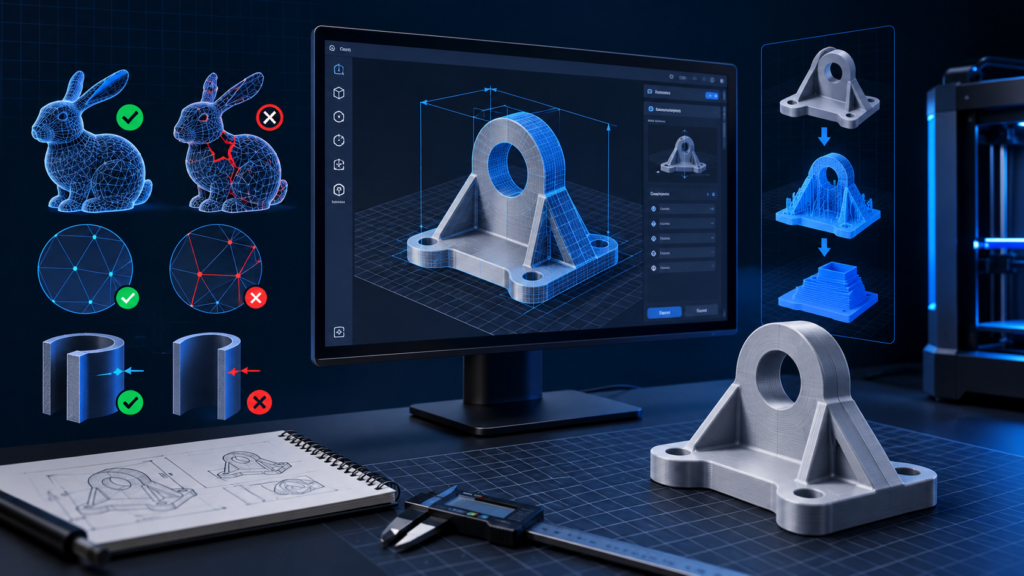
Quick checklist before sending
- Confirm the final dimensions in millimetres
- Inspect holes, shells and thin structural features
- Reopen the exported STL before sending
Possible, but fragile
Do not design below 1 mm. At about 1 mm, a feature may still break, deform, or fail depending on its length, shape, orientation and support.
Stronger and safer
Use 2 mm or more where the design allows. Long, unsupported or heavily handled parts may need to be thicker.
Relative comparison: the 1 mm line is shown at half the thickness of the 2 mm line. Your phone or monitor is not a physical ruler. Measure the feature in the model at final production size.
1. Save a production copy
Keep your editable modelling file untouched. In a separate production copy, remove lights, cameras, reference objects and anything that should not become a physical part. Decide which bodies are meant to be joined and which must remain separate. Label separate components consistently.
2. Confirm units and final dimensions
State the final dimensions in millimetres in your message even when the model looks correct in your own software. After exporting, import the STL into a fresh scene or viewer and check its bounding dimensions; do not assume the export and import applications interpreted the scale identically.
3. Inspect the mesh
Check for holes in surfaces, self-intersections, duplicate shells and faces pointing the wrong way. A visible opening such as a window can be intentional; a gap in the surfaces that define a solid is a different problem. Zero-thickness surfaces need to be turned into suitable solid geometry. Repairs must preserve the intended shape, so inspect the result rather than accepting every automatic repair blindly.
4. Check the smallest features at final size
A 200 mm feature in the building becomes only 1 mm at 1:200. Reduction affects walls, pins, balcony rails and letters as well as the overall model. Simplify or strengthen features that will not survive production and handling; do not merely increase the export polygon count.
At the final printing size, small separate pieces or fragile structural details should not be designed below 1 mm. A feature around 1 mm may still be fragile and can break, deform, or fail during printing, cleaning, assembly or handling. Where possible, 2 mm or more is recommended for stronger, safer parts. This is production guidance, not the printer's layer height.
5. Explain orientation and assembly
Mark the presentation face and identify surfaces where support marks would be a problem. Send the clean model without adding homemade supports unless SHARK specifically requests them. When several pieces must assemble, include a reference view and label the matching joints. Do not expect two exactly equal mating dimensions to fit automatically.
6. Reopen the exported file
Check that every intended part is present, curves look sufficiently smooth and the final dimensions are correct. Export more than one STL when separate parts need different materials or colours. Keep the editable source available for corrections.
What to send SHARK
Supply the final STL files, dimensions in millimetres, quantity, material preference, assembly reference, required appearance and deadline. Mention that the geometry has already been scaled when that is the case. A rendered image is useful for explanation but does not replace the printable model.
Read the design guidelines for walls, fits and supports and visit SHARK 3D printing and prototyping.
Technical references
Software interface wording may vary by version. Production settings must match the actual job.