 FDM Printers


3D Printing Design Guidelines: Walls, Fits, Supports & Detail
Go beyond exporting an STL: make the geometry practical for its final size and intended use.
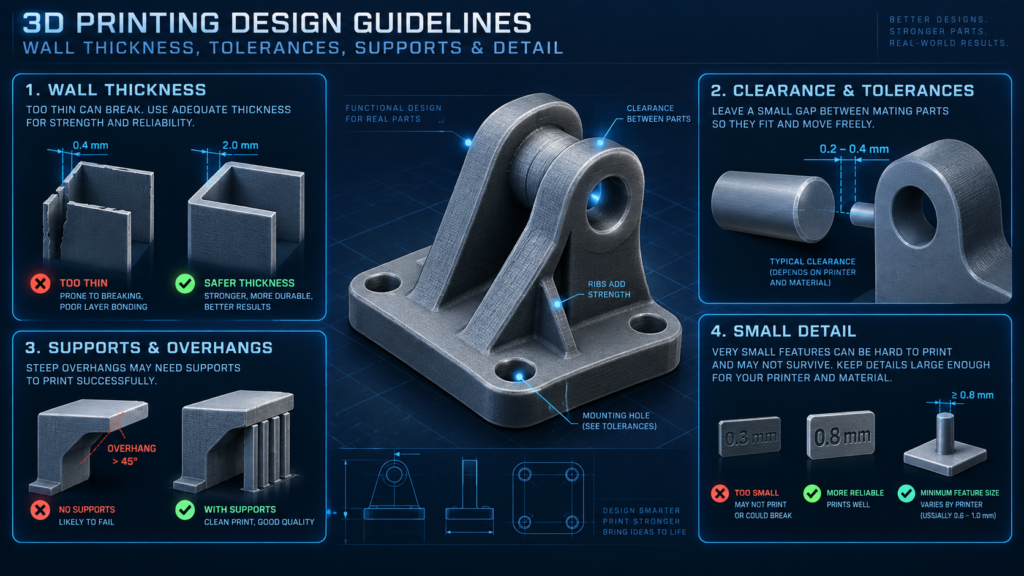
Quick checklist before sending
- Measure the thinnest structural features
- Distinguish fit clearance from wall thickness
- Identify presentation faces and support-sensitive areas
Possible, but fragile
Do not design below 1 mm. At about 1 mm, a feature may still break, deform, or fail depending on its length, shape, orientation and support.
Stronger and safer
Use 2 mm or more where the design allows. Long, unsupported or heavily handled parts may need to be thicker.
Relative comparison: the 1 mm line is shown at half the thickness of the 2 mm line. Your phone or monitor is not a physical ruler. Measure the feature in the model at final production size.
Separate appearance from function
Begin by identifying the surfaces people will see, the areas they will handle and any connection that has to fit another component. Include this information with the model. A part that only needs to look correct on a presentation base should not be specified in the same way as a clip expected to flex repeatedly.
Check wall thickness at the smallest location
Measure actual geometry rather than relying on a shaded preview. Tapered edges, recessed lettering and holes can leave less material than the main wall thickness suggests. A tall wall may need support or extra thickness even when a small test wall works.
Do not design small separate pieces, fragile structural walls, pins or bridges below 1 mm at final size. Features around 1 mm may still be fragile and can break, deform, or fail during printing, assembly or handling. Where possible, use 2 mm or more for stronger, safer geometry. This is not the machine's layer height, a universal limit for every printed detail, or a guarantee that every 2 mm feature is strong enough.
Clearance is not wall thickness
A socket and a peg designed with exactly the same dimension are not automatically a reliable assembly. Tell SHARK whether the joint should slide, rotate, locate loosely or hold firmly. Do not apply the 1 mm small-part minimum or the 2 mm strength recommendation to every clearance: a fit allowance is a separate design decision that depends on the process and joint.
Test one connection first
For repeated joints, prepare a small test sample with the relevant geometry. Checking one representative joint is a more useful starting point than discovering a fit issue across a whole batch. Keep a dimensioned reference for the accepted sample so any later change is intentional.
Review orientation and support contact
A different orientation can trade a cleaner visible face against more support material or a less favourable loading direction. Mark surfaces where support contact would be unacceptable. Do not assume one “upright” view is always the best printing orientation for every part.
Divide large or awkward models deliberately
Discuss splitting when a model is too large, needs several materials or would be difficult to support in one piece. Place joints where they can be aligned and concealed, and account for finishing after assembly. Supply an exploded reference and matching labels rather than leaving the assembly order to guesswork.
Detail should survive the real scale
A 1:200 model does not benefit from every tiny bolt in a full-size CAD assembly. Remove invisible information and strengthen selected details without losing the design intent. Separate any diagram-only annotations from the actual production model.
What to send SHARK
Send the STL and an annotated reference showing critical dimensions, mating components, preferred display face and intended use. Ask for review of the feature that matters most, not only a general statement that the file “looks good”.
Compare PLA and PETG or ask about SHARK's 3D printing and prototyping service.
Technical references
Software interface wording may vary by version. Production settings must match the actual job.