 FDM Printers


How Architecture Students Can Prepare Files for Model Making
Turn a design presentation into an organised production package for cutting, printing and assembly.
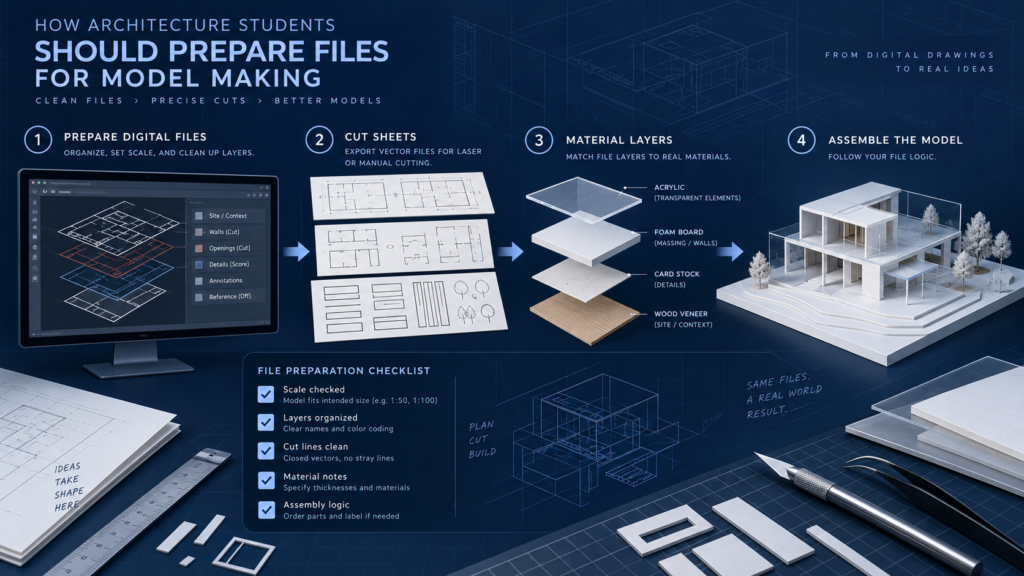
Quick checklist before sending
- Separate reference drawings from production files
- Label scale, material and quantities consistently
- Include a clear assembly reference
Correct dimensions, page order and the approved revision.
Source files, linked assets and instructions, with fonts only where available and permitted.
Printing the supplied design and editing the source files are different handoffs. Name the final revision clearly.
Start with a one-page brief
Include the project name, presentation purpose, final model scale, site boundary, maximum base size and deadline. Mark the elements that matter most to the presentation. Tell SHARK whether the model must travel, include lighting or allow removal of roofs and floors.
Separate reference drawings from production files
Plans, elevations and renders explain the project, but they do not automatically define every cut piece. Provide clean reference PDFs separately from files intended to drive production. Keep construction dimensions and labels on clearly identified reference layers when they must not be cut or engraved.
Project_REV03/
  00_Readme_and_dimensions.pdf
  01_Reference_PDFs/
  02_Laser_parts_by_material/
  03_STL_components/
  04_Assembly_reference/
  05_Artwork_and_labels/
State whether scale has already been applied
Use a clear handoff statement: “CAD reference is full size in millimetres; model scale requested 1:150,” or “These laser parts are already at final physical size; do not rescale.” Apply the same convention across the package. Check that terrain contours, buildings and landscape parts use the same origin and intended scale.
Organise laser parts by material
Identify thickness, colour, quantity and intended operation for each part group. Remove double lines and retain only purposeful cutting paths. Do not lock an entire project into tightly packed nesting before SHARK confirms usable sheet size and production spacing. For repeated components, include an explicit quantity list.
Prepare 3D components as separate solids
Supply the final-size STL for each intended print, plus a screenshot or assembly diagram. Separate components when they require different colours or materials. Avoid including a whole building model when only a stair, façade detail or sculpture needs to be printed.
Review walls, railings, narrow cut bridges and isolated pieces after scaling. Do not design fragile physical features below 1 mm. Features around 1 mm may still be fragile, while 2 mm or more is recommended where the design allows. Some details may still need simplification or a different construction method. Enlarging selected details is a design choice that should be approved, not silently applied.
Make assembly understandable
Use matching labels on a reference diagram and in filenames. Show which side faces outward, where parts overlap and how removable components are retained. Keep optional landscaping and decorative additions separate so a last-minute design change does not invalidate the whole package.
Final handoff checklist
Check revision numbers, scale, material list and quantities against the latest brief. Zip the complete folder. Include a current PDF reference so the intended result can be compared with the production data. Send changes as a new clearly named revision rather than scattered replacement files without explanation.
Review the architectural model scale guide and see SHARK's model-making service.