 FDM Printers


Prepare InDesign Files for SHARK: Preflight, PDF & Package
Send a reliable print PDF and a complete editable package when the layout needs further work.
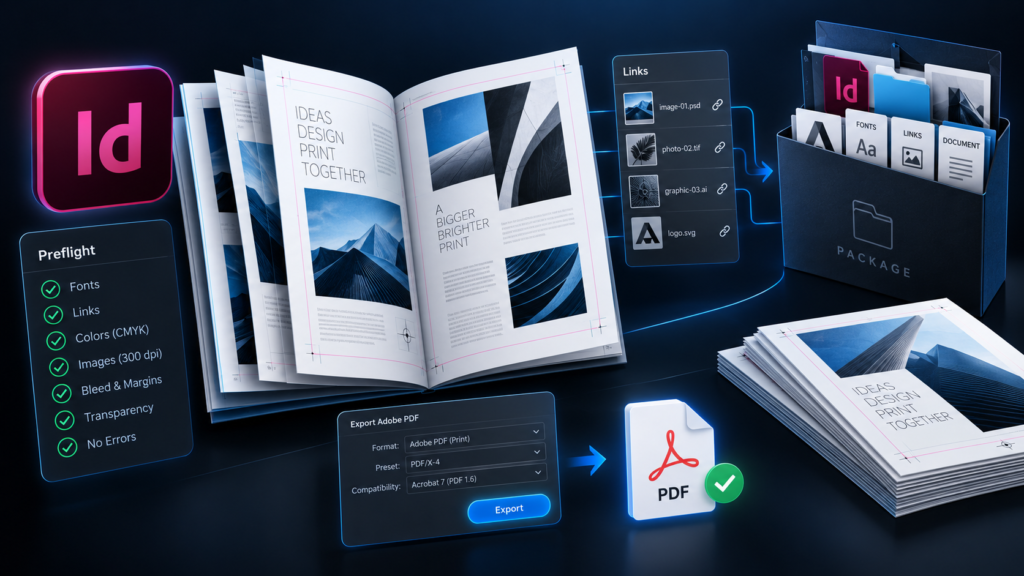
Quick checklist before sending
- Resolve missing links, fonts and overset text
- Inspect the exported print PDF
- ZIP the complete package when editing is required
Correct dimensions, page order and the approved revision.
Source files, linked assets and instructions, with fonts only where available and permitted.
Printing the supplied design and editing the source files are different handoffs. Name the final revision clearly.
1. Preflight before packaging
Check the document's preflight status and investigate missing fonts, missing or modified links, and overset text. Inspect the layout itself as well: an automated check cannot decide that a telephone number is wrong, a caption is outdated or the page order does not suit the project.
2. Confirm pages and finishing
Verify the finished page size, margins and any required bleed. Extend background artwork into the bleed where needed; increasing the bleed value without extending the artwork does not create useful printed bleed. Keep important content away from trimming and binding areas.
For ordinary booklet handoff, supply pages in reading order unless SHARK asks for printer spreads or a specific imposition. Do not guess a spine width for a perfect-bound cover: it depends on the actual paper and page count. Folded brochures also need the correct panel arrangement, not simply equal visual columns in every case.
3. Export the production PDF
Use File → Export → Adobe PDF (Print). Choose the preset and output settings agreed with SHARK. Check the page range, whether pages or spreads are required, and the agreed marks and bleed. Do not add production marks that SHARK has not requested.
Open the exported PDF independently. Inspect its dimensions, page order, images, text and transparency. The PDF is a fixed visual reference for checking the handoff, while the editable package serves a different purpose.
4. Create the package
- Save the current INDD document.
- Choose
File → Packageand review the summary. - Collect the linked graphics and update links to the package where appropriate.
- Include fonts only where the font licence permits redistribution and the software can collect them.
- Include IDML for compatibility when appropriate, and include the final print PDF.
- Check the resulting folder, then ZIP it for a single handoff.
Project.idml
Project_PRINT.pdf
Links /
Document fonts / where available and permitted
Instructions /
Font caution: fonts activated through Adobe Fonts are not copied into an InDesign package. Packaging is not a guarantee that every recipient can edit all text immediately. Identify any font dependency that remains and keep the exported PDF as the appearance reference.
5. Reopen and verify
Open the packaged INDD from the new folder and check the links again. IDML can help with compatibility, but a converted document still needs visual review. Do not rename or move the packaged Links folder after checking it without updating the document references.
For editing, send the whole ZIP package—not only the INDD file. For printing, identify the final PDF and include the job details. A package with several unlabeled “final” PDFs is still an ambiguous handoff.
What to send SHARK
Include the print PDF, complete package when needed, page size, copies, paper and binding instructions, and the revision date. Explain whether SHARK should print as supplied or make specific corrections before proofing.
See presentation and booklet preparation and SHARK printing and copy services.
Technical references
Software interface wording may vary by version. Production settings must match the actual job.