 FDM Printers


Laser Cutting Acrylic: Thickness, Design & File Preparation
Prepare clean cutting paths, distinguish engraving from cutting and design pieces that survive handling.
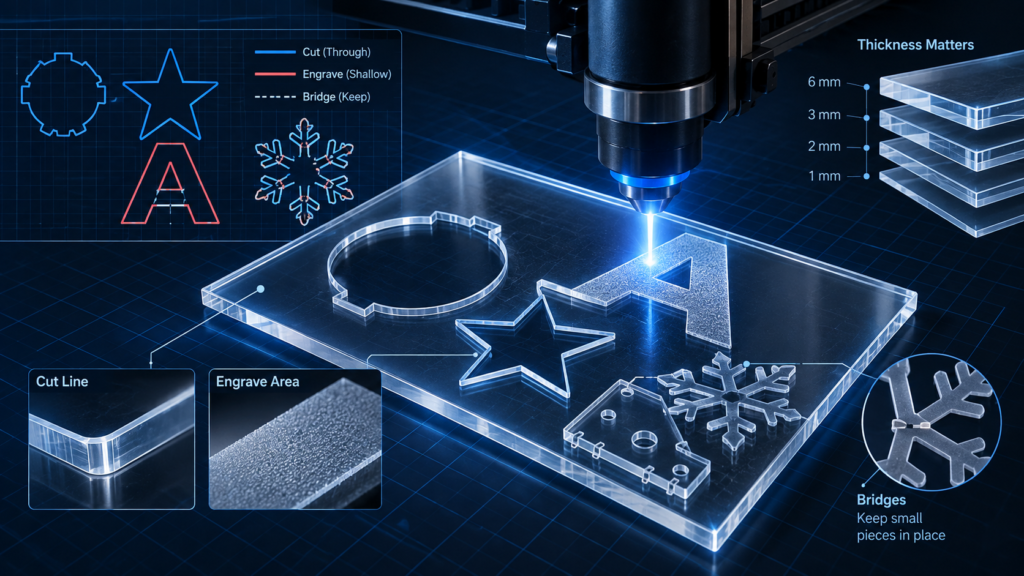
Quick checklist before sending
- Separate CUT, ENGRAVE and reference information
- Remove duplicate paths and identify fragile bridges
- Confirm the material and final physical dimensions
The centre becomes a separate piece when its boundary is cut through.
Plan connections when the centre must stay attached to the surrounding panel.
For physical cut pieces and bridges: do not go below 1 mm. Around 1 mm can still be fragile; 2 mm or more is recommended where possible. Engraved lines are a separate operation.
Define the finished object first
Tell SHARK the finished size, material, nominal thickness, quantity and purpose. A freestanding sign, a model component and an engraved plate need different preparation. Do not choose a sheet only because its colour looks right; assembly, support and the intended display method matter too.
Separate cutting and engraving
Use clearly named layers such as CUT, ENGRAVE and REFERENCE in your working file. These names explain your intention; they are not universal machine commands. Include a small PDF reference showing which lines should cut through, which areas should engrave, and which notes must not be produced. Let SHARK assign the final production settings.
Supply real vector paths for cutting
A photograph of a logo is not a cutting path. Prepare clean vector geometry, outline text in a production copy and check that intended outer boundaries are closed. Remove duplicated lines, stray points and overlapping copies. Do not use an automatic trace without inspecting and simplifying the result. Preserve genuine holes in letters and shapes.
Check islands and narrow bridges
In a cut-through panel, the centre of a letter such as O can fall out unless the design retains it. Plan bridges when the centre must stay connected. Review the remaining material between nearby cuts: a large overall sign can still contain a very weak local connection.
For laser-cut parts, do not design small separate pieces or fragile bridges below 1 mm at final size. Features around 1 mm can break, deform, lift, or be damaged during cutting, cleaning, assembly or handling. Where the design allows, 2 mm or more is recommended for stronger, safer parts. Engraved line detail is a different operation; this guidance is not an engraving-resolution limit or a minimum sheet thickness.
Allow for assembly instead of guessing
For slots and tabs, provide the intended fit and identify the actual material batch. The width of material removed by the cut and the sheet thickness affect the fit. Do not apply an arbitrary universal offset to every part. Request a small test joint before cutting a complete interlocking project.
Material approval comes before production
Use only identified, SHARK-approved materials. Do not supply PVC or unknown plastic for the laser. Blade-cut vinyl belongs to a separate workflow. Confirm the usable sheet area before tightly nesting parts, and allow SHARK to arrange production spacing.
What to send SHARK
Supply the vector file at final physical size, a reference PDF, material and thickness request, quantities, an assembly image and clear cutting/engraving instructions. Mark any supplied file that is still full-size architectural geometry and not yet reduced.
See SHARK laser cutting and engraving or read file preparation for model making.