 FDM Printers


How to Prepare Artwork for Large-Format Printing
Match the artwork to the final size, viewing distance, material and finishing method before exporting.
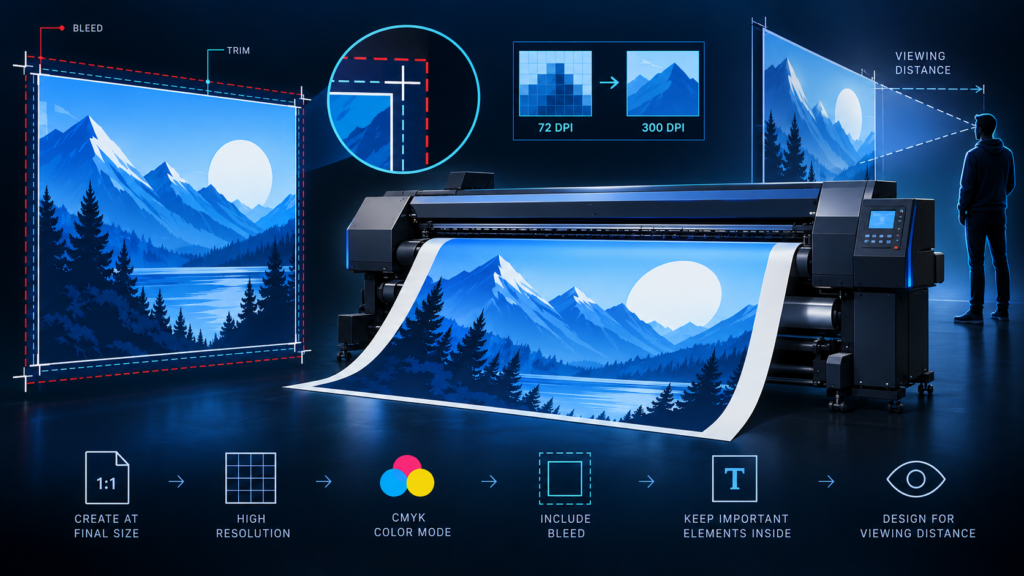
Quick checklist before sending
- State the finished size and any reduced file scale
- Check image detail at the final enlargement
- Confirm bleed, mounting and finishing allowances
3,000 pixels ÷ 10 inches = 300 ppi.
3,000 pixels ÷ 20 inches = 150 ppi.
Without resampling, spreading the same pixels over twice the width halves the pixels per inch.
State finished dimensions, not just a product name
Write the width × height and units in the order message. Identify indoor or outdoor use, the display location and whether the print needs mounting, lamination, hems or other finishing. A poster, a roll-up and a stretched banner can have different safe areas even when their visible sizes look similar.
Work full size where practical
When the document is reduced, label the scale clearly and supply the finished dimensions. A 100 × 200 cm graphic prepared at 1:10 becomes a 10 × 20 cm document. All allowances and the image resolution must be considered at the final enlargement, not only in the small working file.
Example: artwork prepared at 1:10
Document: 100 × 200 mm
Final print: 1000 × 2000 mm
A 1000 ppi image at document size becomes 100 ppi at final size.
Evaluate image detail at the final size
Do not use a screenshot or a compressed messaging preview when the original photograph is available. Check the effective pixel resolution after scaling. Close-viewed displays need a different assessment from a graphic viewed across a road. Ask SHARK to assess a representative crop when image quality is uncertain; simply changing a resolution field does not reveal detail missing from the source.
Keep logos and text sharp
Retain vector logos and live vector shapes in the production PDF when possible. In an editable Illustrator handoff, use outlined text in the production copy and include the images. Review thin light-coloured lettering over photographs and ensure the message can be read from its intended viewing distance.
Leave room for finishing
Extend background artwork beyond the final cut where bleed is required, but keep text and logos away from trimming and hardware areas. Do not invent a bottom allowance for a roll-up cassette or a wrap margin for a frame: obtain the actual template or measurements for that product. A decorative border very close to an edge makes small trimming differences conspicuous.
Control colour and transparency
Use the colour space and output profile agreed with SHARK. Avoid repeated conversions between RGB and CMYK. Review shadows, transparent images and spot colours in the exported PDF; do not flatten the whole document merely as a ritual. For important brand colour, request a sample on the intended material rather than approving only a phone screenshot.
Add a job note: finished size, file scale, copies, material, finishing, required date and which PDF is final. This small handoff note can prevent an otherwise well-designed file from being produced incorrectly.
What to send SHARK
Send the production PDF, the dimensions and finishing brief, and any reference mockup separately. Supply editable files only when editing is required, with their linked assets included.
Explore large-format printing and display and the Photoshop resolution guide.
Technical references
Software interface wording may vary by version. Production settings must match the actual job.